Create Try-On Video
Upload a person photo and a clothing, jewelry, accessory, or wearable item reference to create a short virtual try-on video.
Create Try-On Video
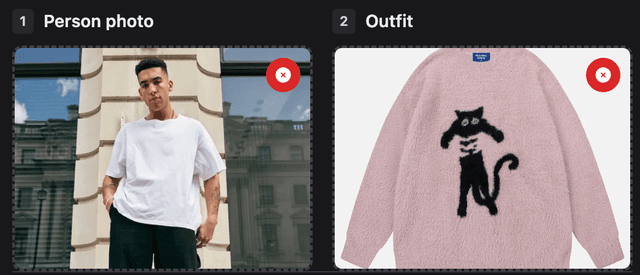
Upload 2 images: first the person photo, then the outfit, jewelry, accessory, or wearable item reference.
Upload person photo
Upload outfit
Your example stays visible while you set up.
See the motion before you generate
Your result will replace this example.
Example image
Upload to replace
Example video
AI Outfit & Accessory Try-On Video Generator
AI Outfit & Accessory Try-On Video Generator
Upload a person photo and a clothing, jewelry, accessory, or wearable item reference to create a short virtual try-on video. Preview styles on a real subject while preserving the person's face, pose, body proportions, and background as much as possible.
Two Images: One Person, One Wearable Item
This effect is built for a clear try-on workflow. The first image anchors the person. The second image anchors the outfit, jewelry, accessory, or wearable item. The generated clip should feel like a short style preview rather than a generic portrait animation.
Upload the person first
Use a full-body or upper-body photo where the face, pose, and body outline are easy to read.
Upload the wearable reference second
Use a clear garment, jewelry, glasses, hat, bag, watch, scarf, product, mannequin, or outfit image with visible color, material, shape, and styling details.
Generate a short try-on clip
Create subtle fashion or product-showcase motion such as a gentle turn, fabric movement, accessory movement, or clean camera push-in.
Review the visual fit
Use the result as a styling preview, shopping concept, or fashion creative draft, not as a measurement-accurate fit guarantee.
Source Images That Make Try-On More Stable
Try-on works best when both images are simple and readable. The model needs to understand the person's shape and the wearable item details before it can create a believable motion preview.
Keep the person unobstructed
Avoid heavy occlusion, extreme poses, crowded group photos, and images where the body outline is hidden.
Use a clear wearable reference
Flat-lay images, mannequin shots, product photos, jewelry close-ups, and clean model photos usually work better than busy lifestyle screenshots.
Show shape and material
Visible sleeves, hem lines, patterns, metal finish, gemstones, hardware, material texture, and color blocks help the output preserve the intended item.
Choose simple lighting
Clean lighting reduces identity drift, unwanted color shifts, and hallucinated garment details.
Useful for Styling, Shopping, and Fashion Content
AI Outfit Try-On is strongest when the goal is a visual preview or creative draft. It can help shoppers, creators, and commerce teams explore clothing, jewelry, accessory, and wearable product ideas faster from existing images.
Personal styling previews
Try a jacket, dress, top, necklace, glasses, watch, bag, or complete outfit on a personal photo before choosing a look.
Ecommerce product concepts
Turn clothing, jewelry, accessory, or wearable product images into quick motion previews for merchandising tests, landing pages, and social concepts.
Creator and social posts
Create short fashion clips for Reels, TikTok, Shorts, mood boards, or outfit reveal content.
Campaign ideation
Preview a clothing direction on a model or creator image before committing to a shoot or editing workflow.
What This Effect Is and Is Not
This is a visual try-on video effect. It is designed for fast creative previews, not exact garment sizing, tailoring, accessory placement, or guaranteed product reproduction.
It preserves identity first
The prompt prioritizes keeping the person's face, hair, body proportions, pose, and background recognizable.
It transfers wearable cues
The second image guides color, pattern, silhouette, fabric feel, metal finish, gemstones, hardware, product shape, and styling details.
It adds controlled motion
The result should use subtle fashion or product-showcase movement instead of dancing, body transformation, or chaotic scene changes.
It is not a size guarantee
Use the output as a visual styling preview. Real fit, sizing, fabric behavior, and measurements still need real product information.
AI Outfit & Accessory Try-On FAQ
Common questions about creating virtual try-on videos from a person photo and a clothing, jewelry, accessory, or wearable item reference.
Explore more AI video effects
Try another focused AI video effect, or browse the complete effects collection.
Create a Virtual Try-On Video
Upload a person photo and an outfit, jewelry, accessory, or wearable item reference to preview a new style in motion.