Convert Video to Anime with AI
Upload an existing clip and create an anime-style version without rebuilding the action from a text prompt. The preset starts with Wan 2.7 and keeps the source motion, timing, framing, and camera path as the structure for the edit.
Turn Real Footage Into Anime Without Recreating the Shot
A video-to-anime edit begins with footage you already have. Instead of asking an AI video generator to invent new action, the source clip supplies the performance and camera movement while the preset supplies a focused animation direction.
1. Upload a continuous source clip
Choose an MP4 or MOV up to 100 MB. The recommended Wan 2.7 workflow accepts clips from 2 to 10 seconds, and the editor checks the duration before generation.
2. Review the anime preset
The page loads a prompt for coherent line art, controlled shading, stable faces, and continuous backgrounds. It also starts with a negative prompt aimed at common video-restyle artifacts.
3. Generate or direct the style
Generate with the preset or open Edit instructions and Advanced to change the model, prompt, resolution, audio behavior, prompt enhancement, or seed. The credit estimate updates before you submit.
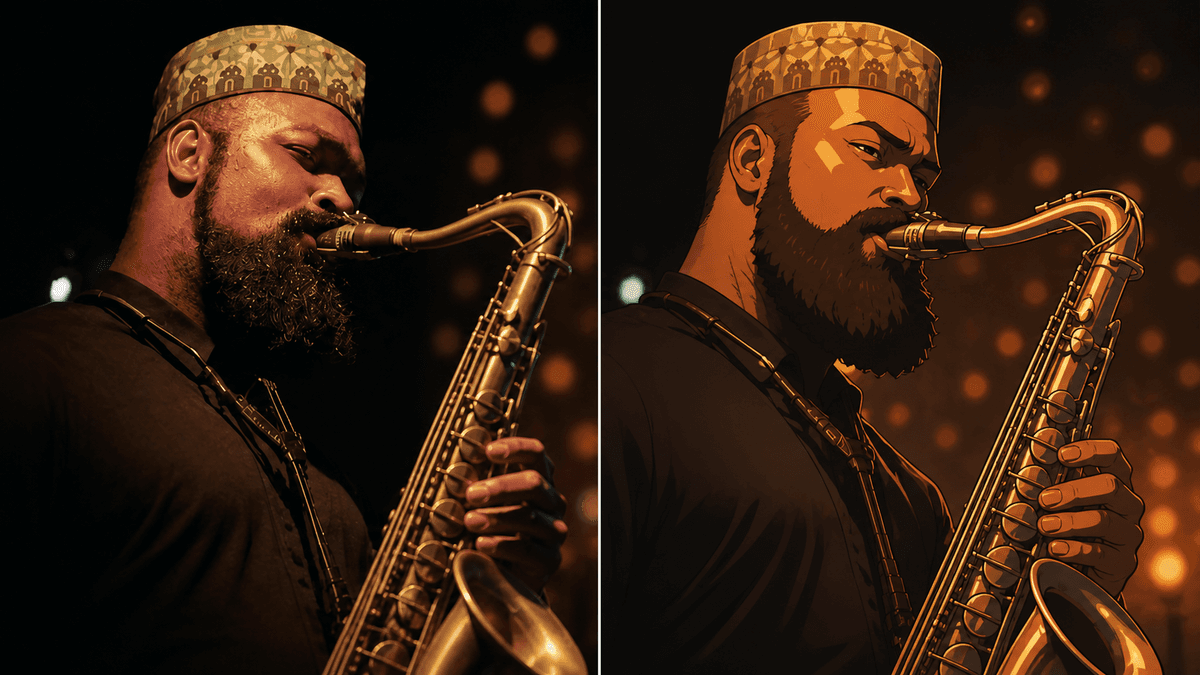
Source Footage That Gives the Restyle a Clear Structure
Generative video editing uses the uploaded clip as guidance, so readable subjects and continuous action give the model stronger information to follow from frame to frame.
Keep the main subject easy to see
Use footage where the person, animal, or object remains large enough to read. Long occlusions, tiny faces, and crowded backgrounds leave less visual information for a consistent anime redraw.
Prefer one continuous action
A dance move, walk, gesture, product turn, or camera move is a clearer input than a montage with several hard cuts. Split edited sequences into separate short clips before restyling them.
Start with stable light and a clean source
Consistent exposure and a less-compressed upload make facial features, clothing edges, and background geometry easier to interpret. Use the highest-quality copy available rather than a repeatedly downloaded version.
Review fast motion frame by frame
Rapid turns, motion blur, hands crossing the face, and objects entering or leaving the frame are difficult transitions. Check the complete output for flicker, warped details, and sudden style changes.
An AI Anime Video Converter Is More Than a Color Filter
A conventional filter changes color and contrast on the existing pixels. A video-to-video AI restyle can redraw lines, shading, materials, and backgrounds while using the source clip to guide motion and composition.
The source video remains the motion reference
Timing, camera movement, and the order of actions come from the upload. This makes the workflow useful when a performance already works and the goal is to change its visual language rather than invent a new scene.
The result is newly generated footage
The model does not simply place a transparent anime overlay on top. It produces new frames, which means faces, fingers, clothing, text, logos, and small objects can change and should be reviewed.
A preset provides a practical starting point
The default direction avoids named franchises and focuses on modern animation traits that can be described visually: coherent outlines, controlled shading, readable expressions, and continuity between frames.
Custom instructions can narrow the look
You can describe softer cel shading, a graphic comic treatment, a restrained color palette, or a more detailed background. Keep the instruction focused so the model can preserve the original action at the same time.
Anime Restyles for Social Clips, Story Tests, and Creative Pitches
Video-to-anime conversion is most useful when real motion already communicates the idea. The generated clip can then act as a shareable creative result or a visual draft for a larger production decision.
Creator posts and short-form videos
Restyle a gesture, transition, dance, outfit reveal, or reaction while retaining the pace of the original recording. Short continuous clips are easier to review before publishing to social platforms.
Character and costume exploration
Use a recorded performance to test whether an anime treatment supports the character silhouette, clothing, and expression. Treat the output as a concept pass and inspect identity-critical details closely.
Music, movement, and performance drafts
Keep choreography and camera timing from a rehearsal while testing a drawn visual direction. Retaining original audio can help the restyled result stay aligned with the source performance.
Storyboards and campaign mood tests
Turn a practical reference clip into an animation-style preview before committing to a longer edit. This helps teams discuss line treatment, color, atmosphere, and continuity using moving footage instead of isolated stills.
Video to Anime FAQ
Practical answers about source footage, anime conversion, prompts, models, audio, and generated results.
Related AI video tools
Continue the workflow with a focused tool for generation, editing, enhancement, or motion control.
Create an Anime Version of Your Video
Upload a short source clip, keep the motion that already works, and start from an editable video-to-anime preset.